




< Back to Data Management System
Author: Johnny Liu, CEO at Dowway Vehicle
Published: March 11, 2026
Article Type: Cluster Page
Audience: Automotive engineers, PLM managers, digital transformation teams, manufacturing engineers, supplier collaboration teams
Johnny Liu is CEO at Dowway Vehicle and works close to vehicle engineering, program execution, manufacturing coordination, and automotive digital systems. This article is written for readers who need a practical view of how Siemens Teamcenter supports vehicle development across design, process, production, supply chain, quality, and service.
- Why Teamcenter Matters in the New Automotive Era
- What Teamcenter Does in Automotive PLM
- Core Architecture of Teamcenter for Automotive Engineering
- Automotive-Specific Adaptation Features
- Product Data Management in Automotive Development
- Multi-View BOM Management Across the Vehicle Lifecycle
- Multi-Disciplinary Collaborative Design
- Process Planning and Manufacturing Collaboration
- Supplier Collaboration in the Automotive Supply Chain
- Practical Advantages of Teamcenter in Automotive Engineering
- Automotive Practice Cases
- Future Direction of Teamcenter in Automotive Engineering
- Frequently Asked Questions
- 1. How do companies connect EBOM and MBOM in Teamcenter for automotive programs?
- 2. How should teams manage engineering changes, urgent shop-floor changes, and revisions without losing traceability?
- 3. Why can Teamcenter or NX-Teamcenter integration become slow with large vehicle assemblies?
- 4. How much customization should a company do in BMIDE and Active Workspace?
- 5. How can Teamcenter support secure supplier collaboration without exposing too much internal data?
- Final Take
Why Teamcenter Matters in the New Automotive Era
The automotive industry has changed fast. A car is no longer just a mechanical product. It is now a combined system made of mechanical parts, electrical systems, electronics, embedded software, simulation models, process data, and service records. As vehicle makers move toward electrification, intelligent functions, and connected services, product complexity rises quickly.
That shift creates pressure across the whole lifecycle. Design teams need to work with electrical and software teams much earlier. Manufacturing engineers need access to current engineering data. Purchasing teams need clear part definitions and timing. Suppliers need controlled access to technical requirements. Quality teams need traceability from released design data all the way to production and service. If these groups work in separate systems with slow handoffs, delays and errors are hard to avoid.
This is where Siemens Teamcenter for Automotive Engineering fits. Teamcenter is a Product Lifecycle Management platform that connects data, people, and workflows across the full lifecycle of a vehicle. In automotive work, that means it can support:
- concept development
- detailed engineering
- process planning
- manufacturing
- quality control
- supplier coordination
- service and maintenance
- end-of-life and recycling records
The Chinese version has added value for local automotive companies because it supports localized user interfaces, coding rules, document practices, and approval processes that fit common business habits in China.
In practical terms, Teamcenter helps solve a familiar set of problems in automotive companies:
- poor collaboration across mechanical, electrical, electronic, and software teams
- disconnected data between design, manufacturing, and procurement
- slow engineering change handling
- BOM mismatches across departments
- weak production traceability
- supplier communication gaps
Instead of treating product data as scattered files, Teamcenter manages it as a connected lifecycle structure.
What Teamcenter Does in Automotive PLM
At the center of Teamcenter are two ideas that matter a lot in vehicle development:
- Single Source of Truth (SSOT)
- Digital Thread
A single source of truth means teams use the same trusted product data instead of copying files between disconnected systems. A digital thread means those data objects stay connected across lifecycle stages, so a change in one area can be traced to its effect in other areas.
This matters in automotive because one product change can ripple across many functions. A revised chassis bracket, battery enclosure, stator part, or body reinforcement may affect:
- CAD models
- engineering BOM
- simulation results
- tooling setup
- manufacturing routes
- supplier instructions
- quality checks
- service documentation
Teamcenter helps companies keep those links under control.
For automotive firms in China, the Chinese version also helps reduce rollout friction. Teams can use a localized interface, follow local coding and approval rules, and fit the platform into domestic quality and compliance practices more smoothly.
Core Architecture of Teamcenter for Automotive Engineering
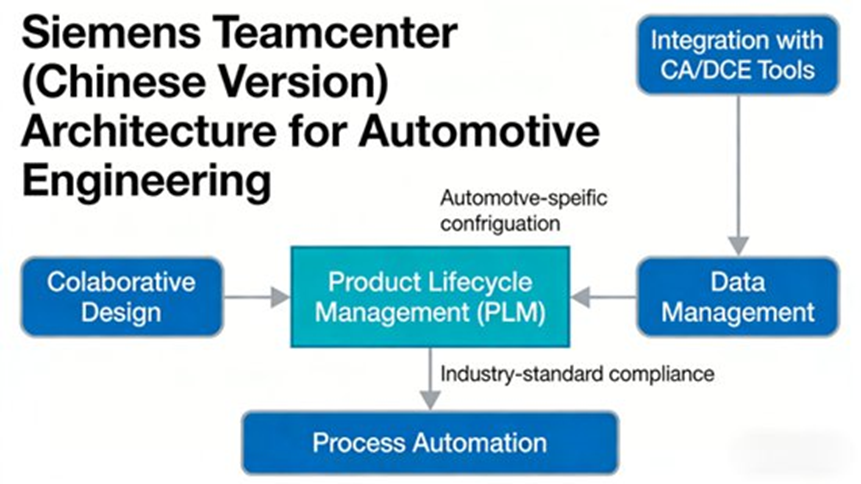
The report describes Teamcenter as a layered, modular platform built around lifecycle consistency, traceability, and collaboration. Its structure can be understood in four layers.
Data Layer
The data layer is the base of the platform. It uses a Unified Data Model to manage and connect product data across the vehicle lifecycle. This includes:
- mechanical design data, such as CAD models and 2D drawings
- electrical and electronic design data, such as ECAD schematics and PCB layout files
- software design data, such as code and requirement documents
- process data, such as process routes and tooling parameters
- quality data, such as inspection reports and failure records
- supply chain data, such as supplier details and part parameters
This structure removes the old split between design, process planning, production, purchasing, and service.
A good example from the report is a suspension arm design change. If a chassis engineer updates the CAD model, Teamcenter can sync related objects such as the engineering BOM, simulation records, process data, and supplier-related information. That reduces the risk of design mistakes and production rework caused by stale data.
Service Layer
The service layer provides common system services. It is built on a microservices-based model and supports:
- workflow engine functions
- permission control
- integration services
- configurable business logic
This fits automotive organizations well because they usually involve many roles, many departments, and many approval steps.
Application Layer
The application layer delivers business-facing functions. The report points to modules such as:
- PDM for product data management
- PPM for project and portfolio support
- SIM for simulation management
- MPM for manufacturing process planning
- SCM-style supplier collaboration capabilities
Because this layer is modular, companies can deploy functions in stages instead of trying to build everything at once.
Interaction Layer
The top layer supports access from:
- desktop
- web
- mobile devices
It also supports dashboards for different user types. For example:
- designers can check model-linked data and approval progress
- process engineers can follow design changes and manufacturing effects
- production managers can see process updates and plan status
- executives can review high-level operating data
The Chinese version also improves usability with a localized interface and simpler workflows for local teams.
Automotive-Specific Adaptation Features
Teamcenter has several features that suit automotive engineering especially well.
Support for Multi-Domain Development
Modern vehicle programs need collaboration across mechanical, electrical, electronic, and software engineering. Teamcenter is designed to connect these areas inside one PLM environment.
Configuration and Variant Management
Automotive companies often build many vehicle models on shared platforms. Teamcenter supports modular BOM management, which helps teams create and manage BOM structures for different variants and trims. This is useful in EV programs where one platform can support several battery, motor, body, and feature combinations.
Localized Compliance Fit
The platform can support local coding rules, local document styles, and approval flows that fit domestic automotive management methods. The report also points out alignment with automotive quality systems such as ISO/TS 16949-style requirements.
Cloud and On-Premises Deployment
Teamcenter supports both deployment paths:
- cloud deployment, which can reduce IT overhead for smaller firms
- on-premises deployment, which can suit large OEMs that want tighter control over sensitive engineering data
Product Data Management in Automotive Development
In vehicle development, the amount of product data is huge. Teams create drawings, design files, technical documents, reports, BOM structures, and process records every day. Without strong data control, companies run into version confusion, data loss, slow search, and poor coordination.
Teamcenter’s Product Data Management (PDM) function is built to solve that.
Unified Control of Product Data
The platform can store and manage many document types in one place, including:
- CAD files
- Office files
- PDF documents
- simulation reports
- technical specifications
These files can also be linked to BOM nodes and product structures, making technical information easier to find.
For example, during engine development, an engineer can pull up a piston’s CAD model, design standard, simulation report, and inspection report from one managed environment instead of switching between separate systems.
Version Control and History Tracking
Teamcenter records the history of design files and documents and supports version comparison and rollback. This is useful when teams need to review old states, compare revisions, or confirm what changed and when.
Engineering Change Management
The report gives strong attention to ECR (Engineering Change Request) and ECN (Engineering Change Notice) workflows. These workflows help manage:
- change initiation
- review
- approval
- execution
- change notification
- traceability
In a vehicle body design case, if engineers change the structure to improve crash safety, the ECR can move across simulation, process, and production teams. Once approved, the ECN updates linked CAD models, BOMs, and process documents so all teams see the current state.
This is one reason Teamcenter is useful in automotive settings where released data must stay under control while changes still move fast enough for program timing.
Multi-View BOM Management Across the Vehicle Lifecycle
One BOM view is never enough in automotive work. Different teams need different product structures, and Teamcenter supports this through multi-view BOM management.
The report highlights three main BOM views:
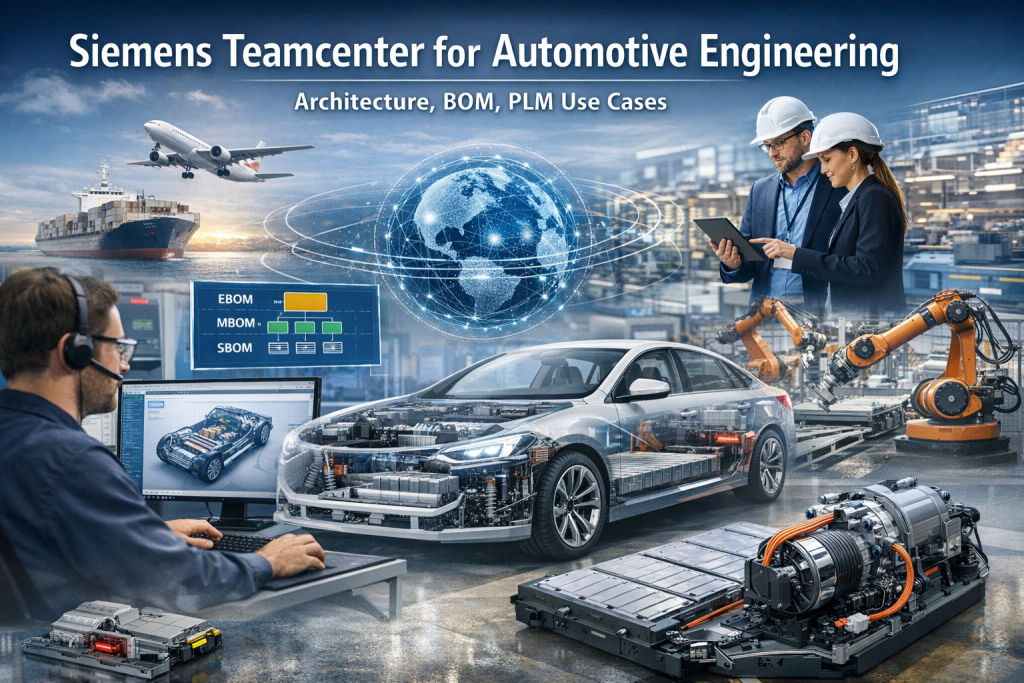
- EBOM (Engineering BOM)
- MBOM (Manufacturing BOM)
- SBOM (Service BOM)
How Teamcenter Connects BOM Views
These BOM structures can be created, linked, and kept in sync. That matters because the same vehicle product needs to be seen in different ways depending on whether the user is in engineering, manufacturing, or service.
A battery pack case from the report shows this clearly:
- the design team creates the EBOM with part composition and design parameters
- the process team derives the MBOM, adding tooling, assembly logic, and process information
- the service team derives the SBOM, adding spare parts and maintenance-related details
If the engineering BOM changes, Teamcenter can send change reminders or downstream updates to the other BOM views. That helps keep design, production, and service aligned.
The report also states that companies using Teamcenter have seen strong improvement in BOM consistency and reduced rework caused by design changes.
Multi-Disciplinary Collaborative Design
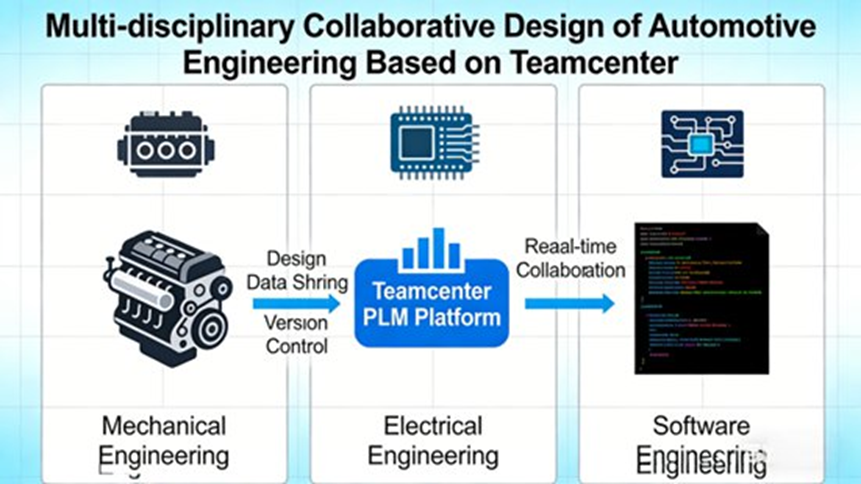
Vehicle development now depends on close work across several technical domains. Old silo-based development creates gaps, especially where system interfaces must match. A body structure may affect harness routing. Battery packaging may affect thermal systems. Software architecture may depend on electronic hardware placement. These links cannot be managed well with disconnected tools alone.
Teamcenter supports multi-disciplinary collaborative design by connecting engineering tools and centralizing lifecycle data.
Integration with Engineering Tools
The report names several core tools that can connect to Teamcenter:
- Siemens NX for mechanical CAD
- Mentor Graphics for ECAD
- Simcenter for simulation
- MATLAB/Simulink for software modeling and control development
This matters because automotive companies often use all these tool types in parallel.
In an intelligent connected vehicle program, the report describes a flow where:
- mechanical engineers design body structure in NX
- electrical engineers create vehicle circuits in Mentor Graphics
- software engineers build driving or control logic in MATLAB/Simulink
All of this data can sync into Teamcenter, which allows teams to view each other’s work earlier and spot interface problems sooner.
The report also mentions Maserati as an example of using NX and Teamcenter together to move more smoothly from design sketches to feasibility study and component development.
Real-Time Collaborative Review
Teamcenter also supports cross-location review. Engineers can view shared models, add comments directly on designs, and track review points.
A case in the report describes an EV R&D team spread across Shanghai, Guangzhou, and Changchun. Using Teamcenter’s collaborative review function, they shared battery pack design models, discussed packaging space and thermal issues, and cut the review cycle from 7 days to 2 days.
Design and Simulation Closed Loop
The report also covers the connection between design and CAE work. Teamcenter can manage simulation data and automate simulation workflows. When a design model changes, related simulation tasks can be triggered, and results can flow back to the design side.
In a chassis development case, if an engineer changes the suspension structure, Teamcenter can trigger suspension dynamics simulation and return results such as ride comfort and handling stability to the design team. This helps engineers adjust the design faster.
The report notes that this kind of closed loop can reduce physical prototypes in chassis development by more than 50% and shorten development time by about 20%.
Process Planning and Manufacturing Collaboration
A common problem in vehicle programs is the gap between design and manufacturing. A part may look acceptable in design review but later prove hard to stamp, weld, machine, or assemble. Teamcenter’s Manufacturing Process Planning (MPM) function helps reduce that gap.
Process Planning Based on Engineering Data
Process engineers can access engineering BOMs and CAD models inside Teamcenter and build:
- process routes
- tooling and fixture designs
- operation plans
- manufacturability feedback
The report uses a vehicle door example. A process engineer reviews the door CAD model, studies stamping, welding, and assembly requirements, and sends direct feedback to the design team if the geometry is poor for welding. That way, the issue can be fixed before production problems appear.
Automatic MBOM Derivation
Teamcenter can derive the MBOM from the EBOM and then add manufacturing details such as:
- process routes
- tooling information
- part processing parameters
- operation-related instructions
When engineering changes happen, MBOM can update as well.
The report gives an EV motor stator case. If the design team changes stator parameters, Teamcenter can update related machining parameters and tooling information in the manufacturing view and notify production teams to act.
Production Collaboration and Traceability
Production, purchasing, and supplier data can also be linked in Teamcenter. Production teams can check part arrival status and adjust plans when needed. During assembly, quality and production data can be recorded into the system.
The report describes a traceability case in final assembly where operators scan component barcodes to view:
- design parameters
- process requirements
- supplier details
At the same time, assembly quality data is recorded. If a problem appears later, teams can trace it back to the specific part, process step, or operator.
Supplier Collaboration in the Automotive Supply Chain
Automotive supply chains are large and layered. A single vehicle program may involve many suppliers across many systems and part categories. Without a shared collaboration method, supplier communication becomes slow, scattered, and hard to control.
Teamcenter supports supplier collaboration through a common platform.
Supplier Portal and Shared Access
Suppliers can use a supplier portal to view:
- part demand
- design specifications
- procurement plans
- design change notifications
They can also submit:
- quotations
- sample inspection reports
- batch production quality reports
This helps reduce communication cost and gives both sides better visibility.
The report includes a case where a domestic automaker used Teamcenter to work with more than 100 suppliers. Suppliers received design change updates more quickly, and response time improved by more than 30%.
Supplier Quality Control
Supplier quality records can be stored and reviewed inside the system. That includes sample reports and batch inspection reports. Automotive companies can then analyze supplier quality performance over time to identify strong suppliers and screen out weak ones.
Procurement and Production Coordination
Because purchasing plans can link with production schedules, Teamcenter also helps keep material arrival aligned with manufacturing timing. This supports more stable plant execution.
Practical Advantages of Teamcenter in Automotive Engineering
The report points out several strengths that make Teamcenter stand out in automotive use.
Localized Fit for Chinese Automotive Companies
The Chinese version includes a localized interface, local coding practices, and workflow fit that can lower training time and rollout cost.
Lifecycle-Wide Collaboration
It supports work across R&D, process planning, manufacturing, supply chain, service, and traceability instead of treating these as separate systems.
Deep Tool Integration
It works closely with automotive engineering tools such as NX, Mentor Graphics, and Simcenter, reducing the need for custom interfaces.
Modular Expansion
Companies can deploy needed modules in stages and extend later as their digital process grows.
Flexible Deployment Options
Cloud and on-premises choices make it easier to match company size, data policy, and IT strategy.
Security and Traceability
Permission control helps protect design and production data. Full lifecycle records also support quality management and compliance.
The report also notes that Teamcenter has been a market leader in PLM for years and is used by nearly all major automotive OEMs worldwide.
Automotive Practice Cases
Case 1: Leading Domestic New Energy Vehicle Company
A major Chinese NEV company used the Chinese version of Teamcenter to build a lifecycle PLM platform that connected R&D, process, production, and supply chain data.
This helped the company reduce interface conflicts and data mismatches in multi-domain EV development. Reported results included:
- 25% shorter R&D cycle
- 30% lower production rework
- 15% lower component procurement cost
Its battery pack team used Teamcenter for mechanical, electrical, and software collaboration, cutting battery pack development time from 12 months to 9 months and improving simulation efficiency by 40%.
Case 2: Joint Venture Automaker
A joint venture vehicle maker used Teamcenter to support global R&D collaboration and supplier coordination. Its China R&D center and overseas engineering teams shared design data and ran collaborative reviews in one platform.
The reported results included:
- 35% higher global R&D collaboration efficiency
- 20% higher component quality pass rate
- 30% faster supply chain response
The report also connects this case to NX-Teamcenter integration that helped move work more smoothly from design sketch to feasibility checking and component development.
Case 3: Commercial Vehicle Company
A commercial vehicle company used Teamcenter to improve process planning and production coordination. By syncing EBOM and MBOM automatically, it achieved:
- 40% shorter process planning cycle
- 50% faster production plan adjustment
It also used lifecycle traceability for chassis and engine systems, which cut quality issue investigation time by 60%.
Future Direction of Teamcenter in Automotive Engineering
The report points to three main development paths for Teamcenter in automotive work.
Digital Twin and Industrial Metaverse Integration
By working with NVIDIA Omniverse, Teamcenter can support photo-real visualization and richer digital twin models. That helps teams perform:
- design reviews
- process simulation
- production simulation
- virtual validation
This can reduce the number of physical prototypes needed and cut both time and cost.
The report gives examples such as virtual crash testing and vehicle performance testing in digital environments.
AI and Big Data Use
The report also notes the use of AI and big data in areas such as:
- design optimization
- process optimization
- quality prediction
- workflow automation
AI can learn from past design and simulation data and suggest better design options. Production and quality data can also be analyzed to predict likely issues earlier.
Cloud Collaboration and Mobile Use
The platform is moving further toward cloud use and mobile access. Engineers and managers can use phones or tablets to review data, approve workflows, and send feedback. This adds flexibility to day-to-day engineering work.
The report also mentions Teamcenter X as a cloud PLM option and notes the availability of a 30-day free trial.
For domestic automotive firms, Teamcenter is not just a software tool. It is a core system for digital transformation across engineering, manufacturing, and supply chain work.
Frequently Asked Questions
1. How do companies connect EBOM and MBOM in Teamcenter for automotive programs?
Short answer:
They usually derive MBOM from EBOM, keep trace links between them, and allow controlled differences where manufacturing needs a different structure.
Expanded answer:
In automotive programs, the engineering team usually builds the EBOM first to define product structure and design intent. The manufacturing team then derives the MBOM and adds process routes, tooling, assembly logic, and plant-specific details.
The hard part is not the first mapping. The hard part is keeping both BOMs connected over time. In some areas, MBOM stays close to EBOM. In other areas, it needs a different structure because of manufacturing constraints, grouped operations, alternative assembly logic, or plant execution rules.
Teamcenter helps by linking EBOM and MBOM rather than treating them as disconnected lists. This is a big deal in automotive work because vehicle programs include many variants, supplier parts, and downstream manufacturing limits. That is why EBOM-to-MBOM mapping keeps coming up in Teamcenter user discussions and is one of the most practical topics in real programs.
2. How should teams manage engineering changes, urgent shop-floor changes, and revisions without losing traceability?
Short answer:
Use formal ECR and ECN workflows for standard changes, and define clear rules for urgent temporary actions so they can be folded back into the controlled release process.
Expanded answer:
The best approach is to run normal engineering changes through a controlled ECR/ECN process and keep urgent manufacturing cases under separate but still traceable rules. Standard changes should record the reason, affected objects, review path, approvals, and execution status inside Teamcenter.
Automotive teams also face urgent plant issues. A supplier deviation, production issue, or late design fix may need immediate action. In those cases, companies need rules for interim changes, supplemental revisions, temporary implementation, and later incorporation into the formal released structure.
This matters because automotive firms need both speed and auditability. Released data cannot become chaotic, but plant teams still need room to react quickly. That balance is exactly why revision strategy and change workflow design are such common Teamcenter discussion topics.
3. Why can Teamcenter or NX-Teamcenter integration become slow with large vehicle assemblies?
Short answer:
Large product structures, too many linked properties, heavy customization, and visualization load are common reasons for slow performance.
Expanded answer:
Automotive assemblies are large, deeply nested, and full of linked information. A single structure may connect CAD files, JT visualization data, documents, attributes, workflows, revisions, and simulation records. When too much is loaded at once, the system can slow down.
Teams usually check these areas first:
- assembly size and structure depth
- number of linked properties and custom attributes
- visualization generation and reconciliation load
- repository and volume setup
- customization overhead
- workflow and property-policy behavior
This is not just an IT issue. If engineers wait too long to load large assemblies or sync product data, work slows down across design, manufacturing, and review teams. In vehicle programs, that can affect daily engineering output.
4. How much customization should a company do in BMIDE and Active Workspace?
Short answer:
Customize only where it brings clear business value, and avoid changing the data model or workflow logic more than needed.
Expanded answer:
BMIDE and Active Workspace give companies a lot of flexibility. Automotive firms often need local data models, special approval chains, role-based dashboards, and plant-specific workflow logic. Those are valid reasons to customize.
Still, too much customization can create trouble later. Common problems include changing deployed attributes without a migration plan, building object models that are hard to maintain, and creating workflow logic that becomes difficult to upgrade.
A good rule is to keep the platform stable and only customize the areas that solve real business pain points. That gives companies local fit without making future maintenance harder than it needs to be.
5. How can Teamcenter support secure supplier collaboration without exposing too much internal data?
Short answer:
Give suppliers controlled access based on role, release status, and business scope, instead of broad access to full internal product data.
Expanded answer:
A secure supplier setup in Teamcenter starts with controlled visibility. Suppliers should only see the data needed for quoting, sample review, engineering discussion, or production preparation. They should not see unrelated product structures, unreleased design data, or cross-program information outside their approved scope.
A secure model often includes:
- role-based permissions
- restricted supplier portals
- controlled document sharing
- managed file transfer methods
- clear outside-network access rules
Automotive companies depend on tiered suppliers and outsourced components, so this topic matters a lot. The real question is not whether Teamcenter can support supplier collaboration. The real question is how to build the right access and governance model for the supply chain.
Final Take
Siemens Teamcenter for Automotive Engineering gives automotive companies a way to connect product data, workflows, simulation, process planning, production records, supplier inputs, and traceability inside one PLM environment.
For companies working on EVs, connected vehicles, and multi-domain development, that matters more than ever. The Chinese version adds practical local fit through language support, coding rules, workflow habits, and compliance alignment. Across R&D, manufacturing, and supply chain work, Teamcenter helps teams keep data consistent, manage changes with control, support production readiness, and improve traceability from design to service.
For automotive firms trying to build stronger digital operations, Teamcenter is not just a data storage system. It is a core working platform for lifecycle coordination.
