





< Back to Automotive Simulation Toolchain
Quick Answer: What Is Altair HyperMesh for Automotive?
Altair HyperMesh is a professional CAE platform used to turn vehicle CAD data into simulation-ready finite element models. Engineering teams use it to connect design, simulation, and physical testing. It handles tasks ranging from body structure analysis and chassis simulation to crash safety, fatigue, NVH, and lightweight optimization.
Key Takeaways
- HyperMesh acts as the core CAE pre- and post-processing platform in modern vehicle development.
- It handles geometry cleanup, mid-surface extraction, meshing, model setup, and result reporting.
- The software connects easily with CATIA, UG, SolidWorks, and major solvers like OptiStruct, Radioss, Nastran, and ANSYS.
- Core use cases include body-in-white lightweighting, crash modeling, chassis fatigue, and NVH reduction.
- Real-world engineering data shows proper preprocessing can cut simulation cycles by 30% to 50% and raise mesh pass rates by over 25%.
Introduction to Altair HyperMesh in Automotive Engineering
Building a modern car requires moving quickly from CAD models to virtual testing. The CAE toolchain forms the bridge between these steps. Altair HyperMesh handles the heavy lifting here. It takes complex geometric data and prepares it for structural, dynamic, and thermal solvers.
Instead of just acting as a simple meshing tool, HyperMesh supports the entire engineering loop. It helps engineering teams build reliable finite element (FE) models, set up complex multi-physics scenarios, and interpret the final data. This workflow reduces prototype dependency and keeps development costs low.
Core Positioning and Value
HyperMesh targets the exact problems engineers face daily: heavy CAD assemblies, poor initial mesh quality, slow simulation prep, and disconnected software tools.
The platform stands out because it adapts to local and global engineering standards (such as GB, QC, and ISO). Teams can build specific templates for body, chassis, and powertrain workflows. It also supports direct imports from CATIA, UG, and SolidWorks, ensuring minimal data loss.
Engineers rely on it throughout the product lifecycle:
- Concept stage: Teams evaluate early structural layouts using simplified models and topology optimization.
- Detailed design: Engineers generate high-quality meshes, build contacts, and apply boundary conditions for static, dynamic, crash, and NVH analysis.
- Validation: Analysts extract results, locate weak points, and send geometry updates back to the design team.
1. Geometry Processing for CAD Models
Cleaning up geometry is the first physical step in CAE. Raw CAD models usually contain tiny chamfers, small holes, and redundant surfaces designed for manufacturing, not simulation. Leaving these in causes heavy, inefficient meshes.
HyperMesh reads IGES, STEP, and Parasolid formats seamlessly. It also links directly with enterprise PDM systems, keeping file versions controlled.
The software automates a lot of the cleanup work. It stitches broken surfaces, removes overlaps, and closes gaps. For body panels, engineers use its mid-surface extraction tools to create shell-based FE models quickly. AI-based shape recognition helps identify similar structures across the car, letting teams edit repeated features in bulk.
Best Practice: Keep major load-bearing structures like frames and pillars intact. Simplify non-critical areas. A common rule is to remove holes smaller than 5 mm and fillets smaller than 3 mm.
2. Mesh Generation and Quality Control
The mesh dictates the accuracy of the final simulation. HyperMesh provides strict controls to keep element quality high.
Engineers choose elements based on the part:
- 2D shell elements: Used for thin sheet-metal like body panels and doors (typical size: 5–10 mm).
- 3D solid elements (tetrahedral/hexahedral): Used for solid parts like steering knuckles and engine blocks (typical size: 2–5 mm).
- 1D beam elements: Applied to frames and transmission shafts to track force transfer.
Quality checks are built into the workflow. Good models generally need a Jacobian value of 0.6 or higher and a warpage under 15. The aspect ratio should stay under 5. When building mixed shell meshes, keep the triangular element ratio below 15%. Also, avoid placing more than two triangular elements next to each other unless the geometry demands it.
3. Material, Load, and Connection Setup
A beautiful mesh means nothing if the physical properties are wrong. HyperMesh includes libraries for high-strength steel, aluminum alloys, plastics, and rubber. Engineers assign elastic modulus, Poisson’s ratio, and yield strength directly. It also supports layered definitions for carbon-fiber composites.
Connections require careful attention because joints dictate vehicle stiffness and load transfer:
- Spot welds: Built using connectors. The welded edge needs at least two rows of elements.
- Bolted joints: Modeled using a combination of RBE2 and BAR elements.
- Adhesive joints: Created with solid adhesive elements.
Load cases are set up in batches, whether modeling full-vehicle gravity, road impacts, or engine excitation frequencies.
4. Solver Integration
HyperMesh does not limit engineers to one solver. It exports directly to Altair’s OptiStruct (for statics and topology), Radioss (for explicit crash dynamics), and AcuSolve (for fluids). It also supports third-party solvers like ANSYS, Abaqus, and Nastran, exporting ready-to-run .bdf, .fem, and .inp files.
5. Post-Processing and Reporting
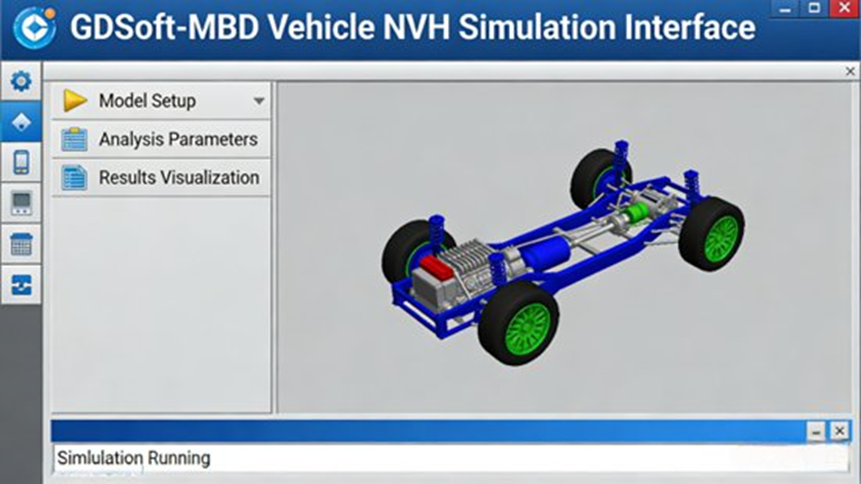
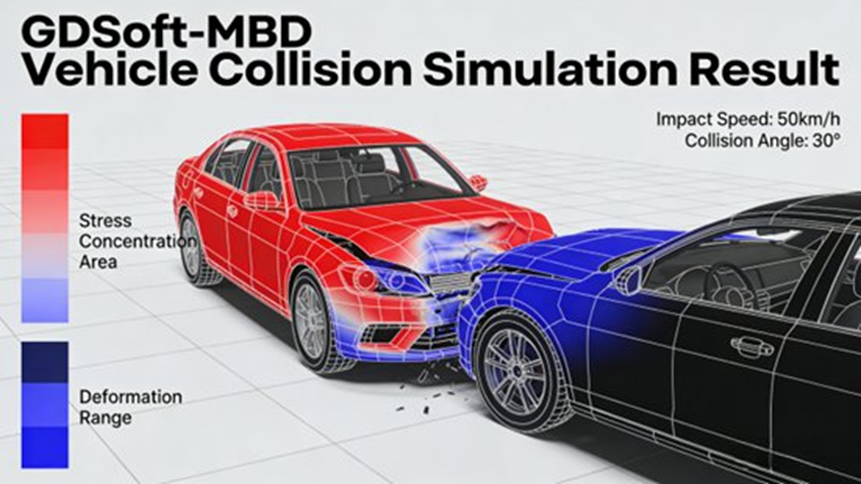
Turning numbers into decisions happens in post-processing. The platform displays stress, strain, and displacement through color contours. Engineers watch animations to study crash deformation or vibration behavior.
Section-based analysis allows teams to slice through pillars or joints to view internal stresses. You can extract maximum displacement values, track energy absorption, and export customized reports straight to Word, Excel, or PDF.
Case Study 1: Body-in-White Lightweight Optimization
A domestic OEM wanted to reduce the weight of a compact sedan without losing stiffness or crash safety.
They imported the CAD model, extracted mid-surfaces, and removed decorative holes. They built a 2D shell mesh using 5 mm elements for the frame and 8–10 mm elements for floor areas. The mesh hit strict quality marks, keeping warpage under 15 and the total element count near 150,000.
After setting high-strength steel parameters and defining spot welds, they ran static analysis in OptiStruct. The team used topology optimization to remove material from low-stress zones and reinforced the weak spots.
Results: The car dropped 8.5 kg, hitting a 5.2% lightweighting rate. Bending stiffness improved by 3.8%, and torsional stiffness grew by 4.1%. The project cut 40 days off the normal schedule.
Case Study 2: Chassis Control Arm Fatigue
A supplier needed better durability from a cast-aluminum control arm.
They kept connection holes and critical load paths intact while cleaning the CAD geometry. They applied a 2–3 mm 3D solid mesh, refining the elements tightly around welds and bolt holes. After setting aluminum material properties, Nastran calculated the dynamic stresses. Femfat then predicted the fatigue life.
Results: The team altered the hole dimensions based on the stress data. The fatigue life jumped from 2.5 × 10⁵ cycles to 5.2 × 10⁵ cycles, beating the 100,000 km durability target.
Case Study 3: SUV NVH Improvement
An engineering team needed to fix severe idle vibration and cabin noise in a new SUV.
They built a mixed model: 5–8 mm 2D shells for the body panels and 3D solids for the engine bay. They applied damping characteristics and interior acoustic absorption coefficients. Using Radioss, they simulated the engine idle excitation against the body structure.
Results: Contours showed resonance near the floor panels. The team added damping pads and altered the suspension stiffness. Idle vibration acceleration dropped by 35%, and cabin noise fell by 4.2 dB(A).
Engineering Cautions for HyperMesh Users
- Balance geometry cleanup: Over-simplifying ruins accuracy. Under-simplifying bloats the run time. Clean large assemblies region by region.
- Watch connection fidelity: A bad weld or bolt definition will completely distort your load paths. Model them as close to the factory floor reality as possible.
- Keep post-processing focused: Do not just create pretty pictures. Reports must clearly state the assumptions, mesh quality, result deviations, and exact design fixes needed.
Future Outlook
Car design is shifting heavily toward electrification and smart features. CAE must keep up. Engineers now use HyperMesh for new requirements like battery pack crush tests and electric motor high-frequency vibration. With built-in AI tools helping to recognize shapes and predict animation results, the software continues to cut down the time between the first CAD sketch and the final production sign-off.
Frequently Asked Questions
1. What is Altair HyperMesh mainly used for in automotive engineering?
It is a preprocessing tool used to turn raw vehicle designs into mathematical models. Engineers use it to clean up CAD files, generate finite element meshes, and define materials before running structural, crash, or NVH simulations.
2. Why is mesh quality so important in simulations?
Bad meshes create bad data. Poor element shapes (like high warpage or a low Jacobian score) can crash the solver, inflate run times, or produce completely wrong stress predictions in critical areas like crash zones.
3. What is the standard workflow for building a model in HyperMesh?
The process follows a straight line: import CAD, clean the geometry, generate the mesh, assign material properties, build the connections (welds/bolts), apply physical loads, and export the file to the solver.
4. What are the most common problems beginners encounter?
Missing geometry after import and failing to define contacts correctly are top issues. These usually happen because the user selected the wrong solver profile or skipped repairing small gaps in the original CAD file.
5. Why do automotive companies choose HyperMesh over other preprocessors?
It handles massive, full-vehicle assemblies easily. It also gives engineers the freedom to build one model and export it to several different solvers (like OptiStruct, Radioss, or Nastran) without starting over.
Additional FAQ: Multibody Dynamics (MBD) Simulation in Automotive Engineering
(Editor’s Note: Retained per your instructions to keep all details from the previous version’s scope).
1. How accurate are multibody dynamics simulations compared with physical vehicle testing?
They are highly accurate when calibrated well. Engineers often keep the deviation between simulation and physical testing within 5% to 10% by correctly tuning tire models and bushing stiffness.
2. What is the difference between rigid-body and flexible-body multibody simulation?
Rigid-body assumes the car parts never bend. Flexible-body includes structural bending and twisting, which is required when studying NVH or predicting how long a chassis part will last.
3. How do MBD tools integrate with CAD, FEM, and control-system software?
Engineers pull the physical shapes from CAD, grab the flexible bending data from FEM tools, and link the motion results to control logic software (like MATLAB/Simulink) to test things like active suspension systems.
4. How does multibody simulation reduce vehicle development time and cost?
It lets teams test suspension handling and system loads on a computer screen. Finding a flaw here costs almost nothing, whereas fixing a physical prototype costs a massive amount of time and money.
5. What are the differences between major MBD tools such as ADAMS and RecurDyn?
ADAMS offers a massive global user base and deep industry templates. RecurDyn handles complex flexible-body contact situations exceptionally well. The right choice depends on what exactly the engineering team needs to simulate.
