


< Back to Automotive Design Toolchain
Author: Johnny Liu, CEO at Dowway Vehicle
Last Updated: March 19, 2026
- Introduction: Automotive CAD Design Tools as the Heart of the Design Process
- Core Features of Automotive CAD Tools
- Popular Automotive CAD Tools in the Industry
- Practical Applications of Automotive CAD Tools
- The Future of Automotive CAD Tools
- Conclusion: The Growing Role of Automotive CAD Tools in the Industry
- Top 5 Most Discussed FAQs about Automotive CAD Tools
- 1. What exactly is automotive CAD software and why is it essential in vehicle design?
- 2. Which key features should I look for in automotive CAD tools?
- 3. What are the most widely used automotive CAD software in the industry today?
- 4. How does automotive CAD software integrate with other tools like simulation or manufacturing systems?
- 5. What are the main challenges beginners face when learning automotive CAD?
Introduction: Automotive CAD Design Tools as the Heart of the Design Process
Automotive Computer-Aided Design (CAD) tools are essential to modern vehicle design, enabling engineers and designers to create accurate, detailed 3D models and simulations before physical prototypes are made. These tools allow for efficient design workflows, improve accuracy, and reduce the risk of errors during manufacturing, which is crucial in today’s fast-paced automotive industry.
The design of a vehicle involves multiple engineering disciplines, from bodywork to chassis to powertrains. CAD tools integrate these diverse stages into one seamless process, helping to streamline communication and collaboration between different teams.
Core Features of Automotive CAD Tools
Automotive CAD tools offer key features that differentiate them from other design software. These tools are not just for modeling; they also play a significant role in performance simulation, data analysis, and design validation.
1. Complex Surface Modeling and Editing
The automotive industry requires highly detailed and complex surface modeling to create body parts with smooth, aerodynamic curves. CAD tools such as CATIA and Siemens NX excel in this area, allowing designers to create highly accurate surfaces using NURBS (Non-Uniform Rational B-Splines).
Key Insights:
- CAD tools enable precise modeling of aerodynamic surfaces, which directly impact vehicle performance and fuel efficiency.
- They also help ensure that components fit together without any interference, preventing assembly issues in the final stages.
2. Large Assembly Management
Vehicles consist of thousands of parts that need to be designed and assembled in a CAD environment. CAD tools support both “top-down” and “bottom-up” assembly design, which is critical for large, complex automotive assemblies.
Key Insights:
- The CAD system helps identify potential interferences between components early in the design phase.
- It also assists in optimizing the placement of parts, ensuring the vehicle’s weight distribution and balance are correctly calculated.
3. Parametric and Standardized Design
The use of parametric design in automotive CAD tools allows for efficient modifications. Changes made to one part of the design can automatically update all related components, reducing the time needed to make adjustments.
Key Insights:
- Parametric design ensures that all changes are applied consistently throughout the model, improving accuracy.
- CAD tools also offer standardized libraries for automotive components, such as fasteners, bolts, and pipes, enabling designers to speed up the process by reusing commonly used parts.
4. Data Interface and Collaboration Compatibility
Automotive design requires collaboration across multiple teams. CAD tools support integration with CAE (Computer-Aided Engineering) tools, CAM (Computer-Aided Manufacturing) tools, and PLM (Product Lifecycle Management) systems, allowing smooth data transfer between these platforms.
Key Insights:
- CAD tools allow teams to share real-time updates, reducing errors and enhancing collaborative efforts.
- They also enable quick iterations by allowing designs to be tested and modified through simulation and performance feedback.
Popular Automotive CAD Tools in the Industry
Several CAD tools are widely used in the automotive industry. Below, we highlight four of the most popular tools: CATIA, Siemens NX, AutoCAD Mechanical, and SolidWorks.
1. CATIA V5/V6 by Dassault Systèmes
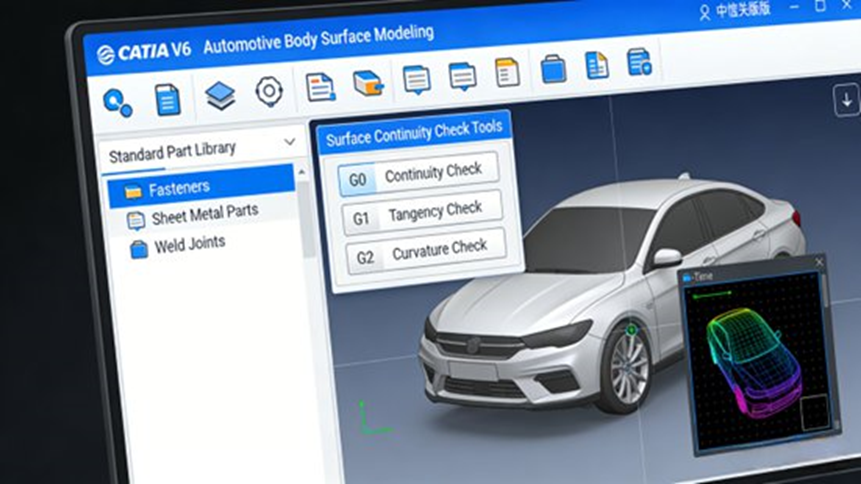
CATIA is a powerful CAD tool used extensively in the automotive industry, particularly for body and exterior design. It offers advanced surface modeling and assembly management capabilities, making it a favorite for automakers like Toyota, Ford, and BMW.
Core Features:
- Advanced surface modeling tools
- Large assembly management
- Multi-disciplinary integration (e.g., body, chassis, electronics)
Applications:
- Car body design
- Exterior component modeling
- Aerodynamic simulations
2. Siemens NX
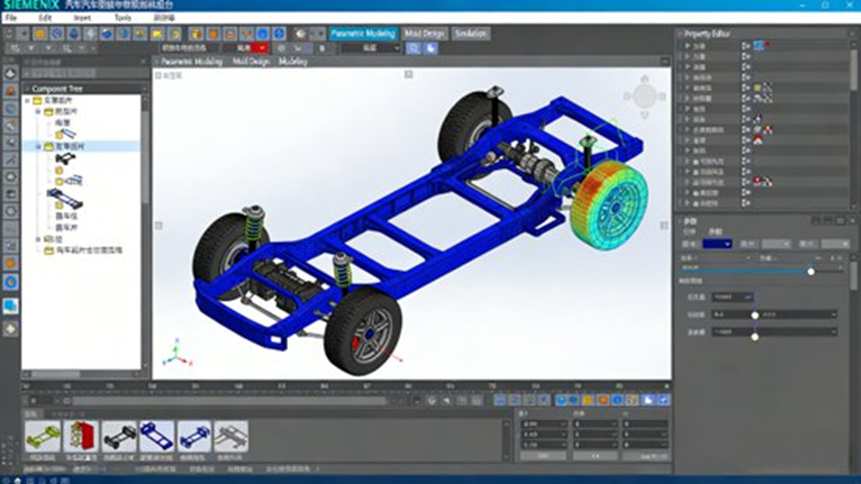
Siemens NX is a comprehensive CAD, CAM, and CAE platform, favored for its parametric design, simulation, and manufacturing capabilities. It is used extensively by companies designing vehicle parts and complex systems.
Core Features:
- Parametric design
- Mold design and simulation
- Strong integration with CAM and CAE tools
Applications:
- Engine design
- Suspension components
- Tooling and mold design
3. AutoCAD Mechanical
AutoCAD Mechanical is ideal for designing smaller automotive components and generating 2D engineering drawings. It’s commonly used for simpler 3D modeling and mechanical component documentation.
Core Features:
- 2D drawing tools
- Component design tools
- Library of mechanical components
Applications:
- Component modeling
- Engineering drawings
- Assembly documentation
4. SolidWorks
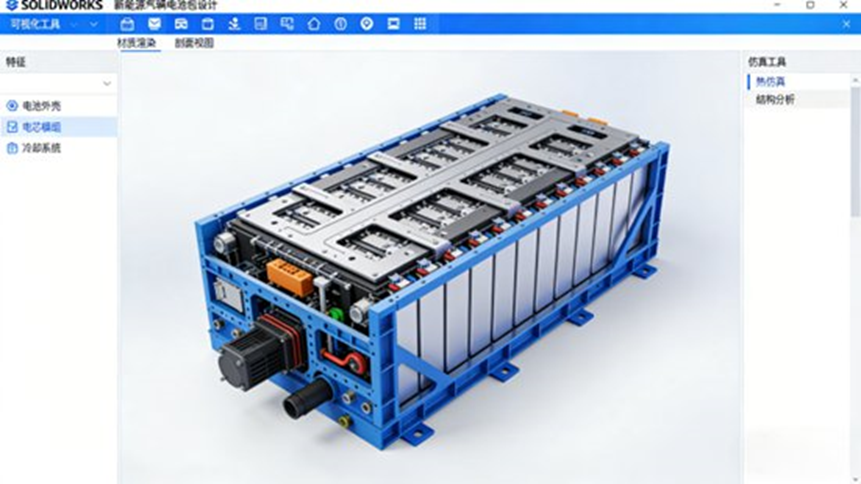
SolidWorks is popular for its ease of use and its strong capabilities in small assembly design and modeling. It’s especially useful for automotive parts like battery packs in electric vehicles.
Core Features:
- Simple parametric design
- Large assembly management
- Integration with CAM and CAE tools
Applications:
- Electrical component design
- Small assembly modeling
- Electric vehicle parts design
Practical Applications of Automotive CAD Tools
Automotive CAD tools are used in every stage of the vehicle development process. Below are some key areas where CAD tools play a vital role.
1. Conceptual Design and Prototyping
CAD tools allow automotive designers to quickly generate and test vehicle concepts. The parametric nature of these tools ensures that modifications are easy and updates are made across the entire model, helping designers evaluate multiple concepts before selecting the best one for further development.
2. Simulation and Validation
Before a design is finalized, automotive CAD tools integrate with CAE systems to simulate various real-world conditions, including stress tests, aerodynamics, and structural analysis. This helps designers ensure that their designs are durable, safe, and optimized for performance.
3. Manufacturing and Assembly
Once a design is complete, CAD tools generate detailed instructions for manufacturing processes through integration with CAM tools. This integration ensures that the components are produced with high precision and that the final assembly will meet all specifications.
The Future of Automotive CAD Tools
As the automotive industry continues to innovate, CAD tools are evolving to meet new challenges. The future of CAD tools will include:
- AI-Enhanced Design: Artificial intelligence is beginning to play a role in automating design processes and suggesting optimizations, helping designers create more efficient and innovative vehicle designs.
- Digital Twin Technology: Digital twins will allow engineers to create virtual models that are continuously updated with real-time data, ensuring ongoing optimization throughout a vehicle’s lifecycle.
- Greater Integration: As vehicles become more connected with digital systems, future CAD tools will need to integrate more seamlessly with embedded software and electronics.
Conclusion: The Growing Role of Automotive CAD Tools in the Industry
Automotive CAD tools are an essential part of modern vehicle design, offering engineers and designers the ability to create precise models, collaborate efficiently, and validate designs before manufacturing. With continuous advancements in AI and digital twin technology, the role of CAD tools in the automotive industry will only continue to grow, improving efficiency and performance in vehicle development.
Top 5 Most Discussed FAQs about Automotive CAD Tools
1. What exactly is automotive CAD software and why is it essential in vehicle design?
Answer:
Automotive CAD (Computer‑Aided Design) is specialized software used to digitally create, modify, analyze, and optimize vehicle components and full assemblies before physical prototypes are made. It enables precise 3D modeling, surface creation, and assembly management, helping reduce development time and error rates compared with manual drafting.
Source: Tripo3D
2. Which key features should I look for in automotive CAD tools?
Answer:
Key features to consider include:
- Advanced 3D modeling for complex surfaces and solid bodies
- Parametric design for automatic updates with dimension changes
- Large assembly management for complex parts
- Interoperability with CAE, CAM, and PLM systems
- Integrated simulation tools for stress, interference, and kinematic checks
These features ensure accurate design and manufacturing readiness.
Source: Tripo3D
3. What are the most widely used automotive CAD software in the industry today?
Answer:
Popular CAD tools include CATIA, Siemens NX, SolidWorks, and AutoCAD Mechanical, each offering specialized features for different aspects of automotive design, from bodywork and component modeling to mold design and simulation.
Source: CanadaCAD
4. How does automotive CAD software integrate with other tools like simulation or manufacturing systems?
Answer:
CAD tools integrate seamlessly with CAE, CAM, and PLM systems, enabling smooth data transfer and collaboration across departments, from design and simulation to manufacturing.
Source: Tripo3D
5. What are the main challenges beginners face when learning automotive CAD?
Answer:
Common challenges include the steep learning curve of 3D modeling, understanding parametric relationships, and managing large assemblies. Beginners may also struggle with integrating CAD with other systems like CAE, CAM, and PLM.
Source: Tripo3D
Author Bio:
Johnny Liu is the CEO of Dowway Vehicle, a leading provider of automotive design and engineering solutions. With over 15 years of experience in the automotive industry, Johnny has led numerous projects aimed at transforming vehicle design processes through innovative tools and technologies. He is dedicated to helping the industry advance by leveraging cutting-edge technology and digital workflows in automotive design.
