

< Back to Electrical & Electronic Toolchain
Last Updated: March 19, 2026
Author: Johnny Liu, CEO at Dowway Vehicle
- ✅ Direct Answer
- Why This Matters
- Where It Fits in Development
- Why Traditional Tools Fall Short
- Fragmented Workflows
- Growing ECU Complexity
- Heavy Hardware Dependence
- Limited Automation
- 1. ECU Calibration (CCP/XCP)
- 2. Bus Simulation
- 3. Automated Testing (No-Code)
- 4. Data Acquisition and Analysis
- Architecture
- Hardware Support
- Software Integration
- Engine ECU Calibration
- BMS Testing (EV)
- EOL Production Testing
- AI in Testing
- New Protocols
- Software-Defined Vehicles
- What are the key advantages of TSMaster VP compared to CANoe or CANape?
- How does TSMaster handle real vehicle data without interfering with the network?
- Can TSMaster support CAN FD and Ethernet?
- How effective is TSMaster for automated testing and EOL?
- What limitations do engineers still mention?
✅ Direct Answer
Automotive ECU calibration and testing software is used to tune ECU parameters, simulate vehicle networks, run automated tests, and analyze system data. Platforms like TSMaster bring these functions into one place, helping engineers work faster and avoid switching between multiple tools.
- One platform replaces CANoe, CANape, and INCA workflows
- Real-time calibration with CCP/XCP
- Full bus simulation without a full vehicle
- No-code automation for batch and EOL testing
- Works with MATLAB, CarSim, Python, and common hardware
Why This Matters
A few years ago, testing an ECU meant juggling several tools and hoping everything stayed in sync.
Now? That approach breaks down fast.
EVs, ADAS systems, and connected vehicles have pushed ECU complexity to a point where fragmented workflows just don’t hold up anymore.
I’ve seen teams spend more time managing tools than actually testing systems.
That’s the real problem modern platforms solve.
What Is Automotive ECU Calibration and Testing Software?
It’s the software engineers use to adjust ECU behavior, verify system performance, simulate communication, and automate testing.
Where It Fits in Development
- Model development (MATLAB/Simulink)
- Simulation
- ECU calibration
- System validation
- Production testing (EOL)
Why Traditional Tools Fall Short
Most teams still rely on:
- CANoe
- CANape
- INCA / LABCAR
The issue isn’t capability — it’s fragmentation.
Different tools, different workflows, disconnected data.
That slows everything down.
What Problems Does This Software Solve?
Short answer: efficiency, accuracy, and scalability.
Fragmented Workflows
Switching tools creates delays and errors.
Growing ECU Complexity
- ICE → basic control
- EV → battery + motor + thermal
- ADAS → sensors + networking
Heavy Hardware Dependence
Without simulation, you need the full vehicle setup.
That’s expensive and slow.
Limited Automation
Manual testing doesn’t scale — especially in production.
Core Capabilities Explained
1. ECU Calibration (CCP/XCP)
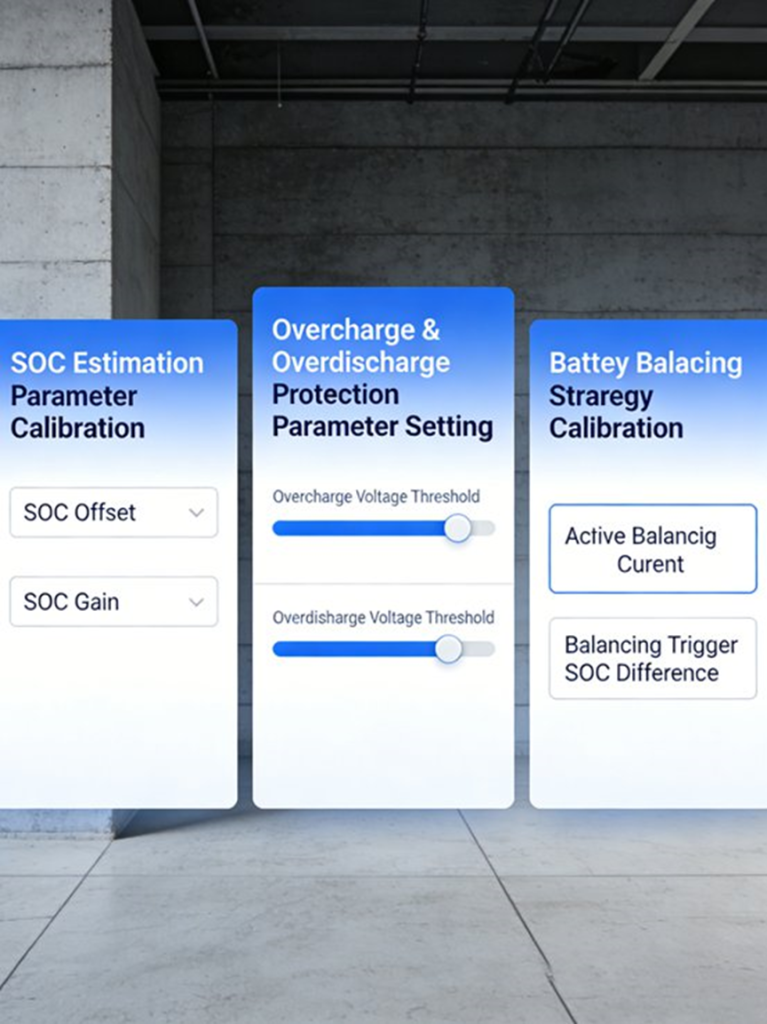
ECU calibration lets you change parameters in real time.
What You Can Do
- Adjust fuel injection
- Tune ignition timing
- Modify motor torque
- Calibrate BMS SOC
Key Features
- Online calibration (no restart needed)
- Offline editing (.A2L files)
- MAP and 3D curve editing
2. Bus Simulation
Bus simulation recreates vehicle communication.
Supported Protocols
- CAN / CAN FD
- LIN
- FlexRay
- Ethernet
What You Can Simulate
- Normal communication
- Fault conditions
- Node failures
Residual Bus Simulation (RBS)
Short answer: it simulates missing nodes.
That means you don’t need the full network to run tests.
3. Automated Testing (No-Code)
Instead of writing scripts, you build test logic visually.
What This Enables
- Batch testing
- Regression testing
- One-click execution
- Automatic reports
4. Data Acquisition and Analysis
You don’t just test — you collect everything.
Data Sources
- Bus signals
- GPS
- Video
- Radar
Capabilities
- BLF recording and replay
- Signal visualization
- Multi-source analysis
How TSMaster Virtual Platform Works
TSMaster is built with a layered architecture.
Architecture
- UI Layer → interface and dashboards
- Functional Layer → simulation, calibration, testing
- Driver Layer → hardware and protocol control
Why This Matters
It keeps everything flexible:
- Custom layouts
- Scalable features
- Works with different hardware
Hardware Support
- Vector
- Kvaser
- PCAN
- Intrepid
Software Integration
- MATLAB / Simulink
- CarSim
- Python / C++ / LabVIEW
- J2534 interface
Real Engineering Use Cases
Engine ECU Calibration
Quick example:
- Idle target: 800±50 rpm
- Adjust injection and ignition
- Test under load changes
Results
- Completed in 2 days
- Efficiency +40%
- Stability +30%
- Fuel economy +5%
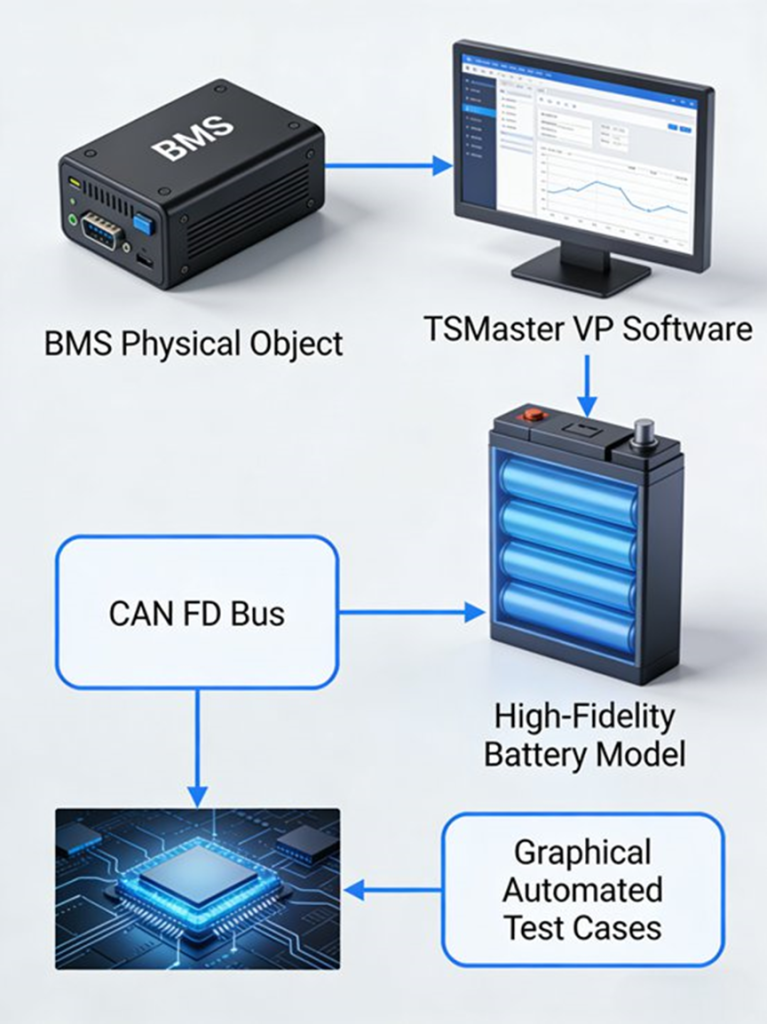
BMS Testing (EV)
What Gets Tested
- SOC accuracy (±2%)
- Battery balancing
- Safety limits
Test Conditions
- -20°C
- 25°C
- 55°C
Results
- Time: 40 → 15 minutes
- Efficiency +60%
- Yield: 99.5%
EOL Production Testing
Short answer: fully automated batch testing.
What It Includes
- Multi-device testing
- Pass/fail logic
- Report generation
Step-by-Step Workflow
- Connect hardware
- Load DBC and A2L files
- Start calibration
- Run simulation
- Execute automated tests
- Collect data
- Generate reports
TSMaster vs Traditional Tools
The difference is simple.
Traditional Tools
- Separate systems
- More setup
- Higher cost
TSMaster
- All-in-one platform
- Faster workflow
- Lower cost
- Works across lab, road, and production
Where This Software Is Used
- Lab testing
- Road testing
- Production lines
- Component validation
How to Choose the Right Tool
Focus on:
- Protocol support
- Automation
- Hardware compatibility
- Integration
- Cost
Future Trends
AI in Testing
- Auto-generated test cases
- Smarter diagnostics
New Protocols
- Automotive Ethernet
- 5G-V2X
Software-Defined Vehicles
Testing is shifting toward software-driven validation.
Advanced FAQs (Recent Discussions)
What are the key advantages of TSMaster VP compared to CANoe or CANape?
Short answer: integration and cost.
TSMaster combines simulation, calibration, diagnostics, and automation in one platform. It works with multiple hardware vendors and costs less than traditional tools. Some engineers still prefer CANoe for very complex HIL setups, but for most workflows, TSMaster is more efficient.
How does TSMaster handle real vehicle data without interfering with the network?
Short answer: it uses a safe listening mode.
TSMaster has a real vehicle acquisition mode where all channels are listen-only. It does not send messages to the network. It also adjusts internal termination automatically, reducing the risk of affecting the vehicle during testing.
Can TSMaster support CAN FD and Ethernet?
Short answer: yes, with ongoing improvements.
It supports CAN, CAN FD, LIN, FlexRay, and Ethernet. It also includes XCP on Ethernet and packet filtering. CAN support is mature. Ethernet features are improving with updates.
How effective is TSMaster for automated testing and EOL?
Short answer: very effective for production.
It allows no-code automation for batch ECU and BMS testing. Teams report 40–60% faster testing cycles. It works well for both development and production environments.
What limitations do engineers still mention?
Short answer: ecosystem and advanced use cases.
Some users mention a learning curve for scripting and APIs. Others note that complex HIL setups may still require tools like Vector. There is also demand for better AI features and cloud integration.
Final Insight
Here’s what I’ve seen across multiple programs:
Teams that switch to integrated platforms don’t just save time.
They change how they test.
Less manual work.
Less tool switching.
More control over the entire process.
That’s where the real advantage is.
Author
Johnny Liu
CEO, Dowway Vehicle
Johnny Liu has led ECU calibration, vehicle electronics development, and testing systems across ICE and EV programs. His work focuses on improving testing efficiency, automation, and production scalability in modern automotive engineering.
