


< Back to Automotive Design Toolchain
Author: Johnny Liu, CEO at Dowway Vehicle
Last Updated: March 2026
- 1. Introduction to NX-CAM and Its Role in Automotive Manufacturing
- 2. NX-CAM’s Integration in Automotive Design Tools
- 3. Core Features of NX-CAM (Chinese Version)
- 4. Key Technical Modules of NX-CAM for Automotive Parts
- 5. Application of NX-CAM in Automotive Engineering
- 6. Local Adaptations: Benefits of the Chinese Version of NX-CAM
- 7. NX-CAM for Advanced Automotive Manufacturing
- 8. Conclusion: The Future of NX-CAM in Automotive Manufacturing
- 9. Frequently Asked Questions (FAQ)
- Top 5 FAQs on NX‑CAM (in English, Latest Discussions)
- ❓ 1. What is NX‑CAM and how does it integrate into the automotive design-to‑manufacturing toolchain?
- ❓ 2. How do I get started with basic NX‑CAM operations (installation, setup, modules)?
- ❓ 3. What are the main capabilities of NX‑CAM for CNC programming and machining?
- ❓ 4. How does NX‑CAM differ from other CAM software?
- ❓ 5. What learning resources and community support exist for NX‑CAM users?
1. Introduction to NX-CAM and Its Role in Automotive Manufacturing
The automotive industry is going through a big change, and NX-CAM is helping lead the way. Developed by Siemens, NX-CAM (Chinese version) connects design and production, making the process faster, more accurate, and cost-effective. By turning design models into machining instructions, NX-CAM automates many tasks, helping manufacturers reduce production time while improving quality.
NX-CAM is a critical part of the modern automotive manufacturing process, offering solutions that cut down setup times, minimize errors, and boost production efficiency.
2. NX-CAM’s Integration in Automotive Design Tools
NX-CAD Integration: Simplifying the Design-to-Manufacturing Workflow
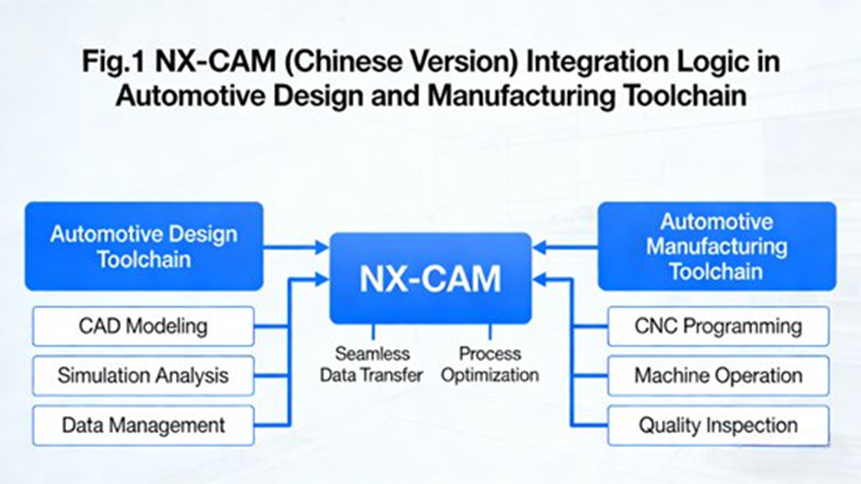
NX-CAM works closely with NX-CAD, Siemens’ computer-aided design (CAD) tool, to convert CAD models into machining instructions without needing to convert files. This integration speeds up the transition from design to production, especially for complex automotive parts like body panels or engine blocks.
NX-CAE Collaboration: Enhancing Simulation and Performance
NX-CAM doesn’t just rely on CAD—it also integrates with NX-CAE, Siemens’ simulation tool. This collaboration allows manufacturers to analyze and optimize machining processes before they begin production, ensuring the final product meets both performance and manufacturing requirements.
CNC Machines and Robotics Integration: Real-Time Production Feedback
NX-CAM also connects directly with CNC machines and robotic systems, allowing real-time feedback on the production floor. This integration ensures manufacturers can adjust processes on the fly to prevent errors, keeping production running smoothly.
3. Core Features of NX-CAM (Chinese Version)
NX-CAM (Chinese version) includes a variety of features tailored to meet the unique needs of the automotive industry:
Automated Programming: Smart Feature Recognition and Template-Based Programming
NX-CAM can automatically detect key features in CAD models, like holes, slots, and curves. This feature recognition reduces the time spent manually selecting features, speeding up the programming process. Additionally, template-based programming uses pre-designed templates for commonly used automotive parts, making the programming process even faster.
Simulation and Validation: Virtual Machining and Collision Detection
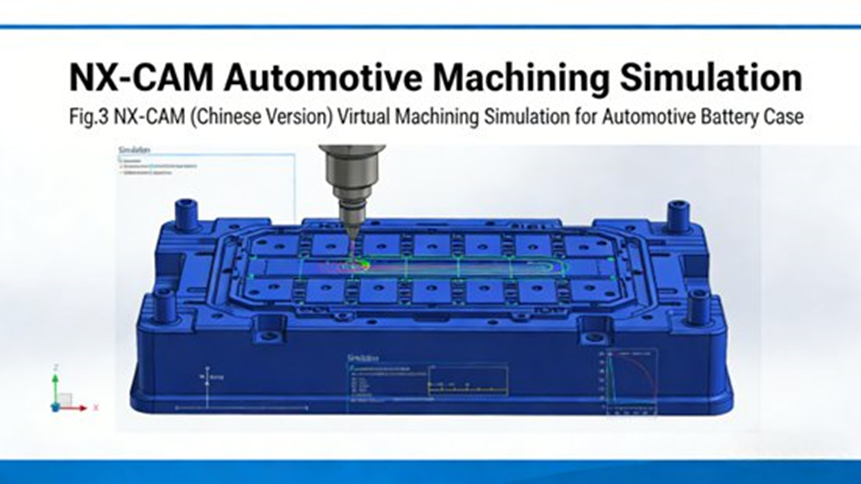
NX-CAM includes a simulation feature that allows manufacturers to virtually test their machining processes before they start production. This helps avoid mistakes, such as tool collisions or incorrect cuts, ensuring the process is safe and accurate.
Post-Processing Capabilities: Compatibility with Domestic and International CNC Machines
NX-CAM supports over 1,000 post-processors, which are compatible with both domestic (e.g., Shenyang, Dalian) and international CNC machines (e.g., Mazak, DMG Mori). This makes it easier for automotive manufacturers to work with different machines without worrying about compatibility issues.
Process Standardization: Ensuring Consistency Across Operations
NX-CAM’s process management tools help standardize production processes across multiple machines and departments, ensuring that every operation is done the same way, improving efficiency and reducing errors.
4. Key Technical Modules of NX-CAM for Automotive Parts
NX-CAM includes several key modules specifically designed for the automotive industry:
Programming and Automation: Optimizing Complex Automotive Parts
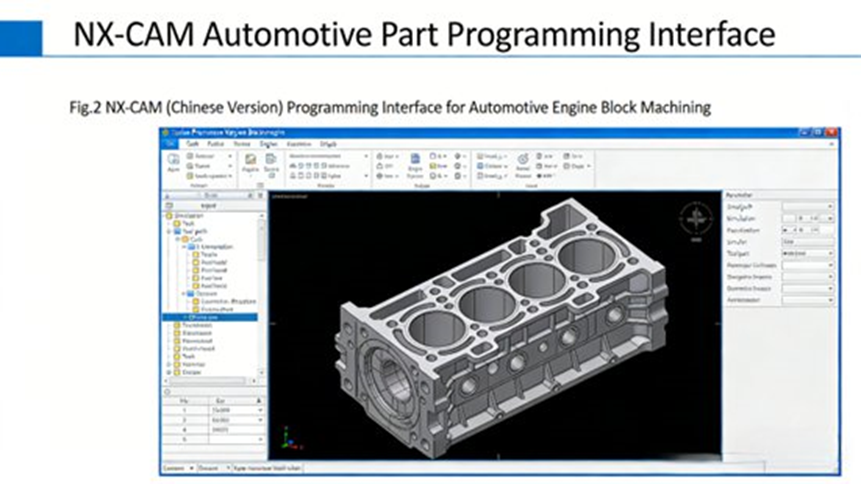
NX-CAM automates the creation of toolpaths for complex automotive parts, like engine blocks or transmission housings. With feature-based programming, it can automatically apply machining strategies to the recognized features in the CAD model, making the process faster and more accurate.
Simulation and Verification: Ensuring Precision
NX-CAM’s simulation tool ensures that the entire machining process is verified before it begins. This helps manufacturers check for errors in the tool paths and ensure that the machining process will go smoothly once it starts on the production floor.
Post-Processing & CNC Integration: Seamless Production
NX-CAM’s post-processing features ensure that the instructions generated can be directly applied to CNC machines, whether domestic or international, without requiring additional adjustments or file conversions.
Process Management: Streamlining Operations
NX-CAM’s process management tools help keep the workflow running smoothly across departments. This ensures that all the steps, from design to production, are properly coordinated, improving efficiency and reducing delays.
5. Application of NX-CAM in Automotive Engineering
Case Study: Automotive Engine Block Manufacturing
NX-CAM has been used in engine block manufacturing, where precision is critical. The software automates much of the programming, reducing the setup time and ensuring the final product meets the specifications, such as bore holes and oil passageways.
Case Study: New Energy Vehicle (NEV) Battery Pack Casing
NX-CAM also helps in the production of battery pack casings for new energy vehicles (NEVs). With high-speed milling and layered cutting, the software prevents deformation in thin-walled parts, ensuring that the final product is precise and meets required tolerances.
Case Study: Automotive Body Molds and Tools
In body mold production, NX-CAM ensures that complex curves and tight tolerances are met. Its advanced milling strategies produce high-quality molds with minimal manual input.
6. Local Adaptations: Benefits of the Chinese Version of NX-CAM
NX-CAM (Chinese version) offers several localized benefits for manufacturers in China:
- Chinese Language Interface: The full Chinese language support makes it easier for local engineers to learn and use the software.
- Compatibility with Domestic CNC Machines: NX-CAM supports domestic CNC machines, such as those from Shenyang and Dalian, making it ideal for local manufacturing needs.
7. NX-CAM for Advanced Automotive Manufacturing
NX-CAM isn’t just a tool for traditional machining. It’s part of the smart manufacturing revolution, integrating artificial intelligence (AI) and digital twin technology. These innovations allow manufacturers to predict and adjust processes in real-time, ensuring continuous improvement in production and efficiency.
8. Conclusion: The Future of NX-CAM in Automotive Manufacturing
NX-CAM is a powerful tool that will continue to play a key role as the automotive industry embraces electric vehicles (EVs), autonomous driving technologies, and smart manufacturing. Its ability to integrate design, simulation, and production processes will remain essential as automotive manufacturers push towards faster, more accurate, and more cost-effective production methods.
9. Frequently Asked Questions (FAQ)
Q1: What is NX-CAM, and how does it benefit automotive manufacturing?
NX-CAM is a computer-aided manufacturing (CAM) software that helps convert CAD models into actionable machining instructions. It benefits automotive manufacturing by improving precision, reducing setup times, and optimizing the machining process.
Q2: How does NX-CAM integrate with other CAD/CAE systems in the automotive industry?
NX-CAM integrates with NX-CAD and NX-CAE, creating a seamless design-to-production workflow that minimizes errors and enhances product quality.
Q3: What are the advantages of using NX-CAM for engine block machining?
NX-CAM automates complex programming, increases precision, and reduces errors, leading to faster production and better quality in engine block manufacturing.
Q4: How does NX-CAM optimize production in new energy vehicles (NEVs)?
NX-CAM uses advanced milling strategies to ensure precision in battery pack casings, even for thin-walled parts, improving production speed and quality in NEVs.
Q5: Is the Chinese version of NX-CAM suitable for international automotive manufacturers?
Yes, the Chinese version is designed to support both domestic and international CNC machines, ensuring compatibility with a wide range of equipment.
Top 5 FAQs on NX‑CAM (in English, Latest Discussions)
❓ 1. What is NX‑CAM and how does it integrate into the automotive design-to‑manufacturing toolchain?
Answer:
NX‑CAM is a high‑end computer-aided manufacturing (CAM) solution that generates CNC toolpaths, simulates machining, and outputs production‑ready G‑code. It integrates tightly with NX CAD and NX CAE to ensure a smooth process from design to machining. ([Siemens Digital Industries Software][1])
❓ 2. How do I get started with basic NX‑CAM operations (installation, setup, modules)?
Answer:
Start with NX‑CAM introductory training on Siemens’ platforms to learn installation, user settings, core CAM functions, and integration basics. ([ad.siemens.com.cn][2])
❓ 3. What are the main capabilities of NX‑CAM for CNC programming and machining?
Answer:
NX‑CAM offers automated toolpath generation, multi-axis machining, CAD integration, simulated machining for error-free production, and post-processing with support for hundreds of CNC machine types. ([Siemens Digital Industries Software][1])
❓ 4. How does NX‑CAM differ from other CAM software?
Answer:
NX‑CAM is part of an integrated CAD/CAM/CAE ecosystem, reducing errors and setup time, offering real-time simulations, and connecting to digital twin and PLM systems like Teamcenter. ([Siemens Digital Industries Software][3])
❓ 5. What learning resources and community support exist for NX‑CAM users?
Answer:
Resources include official NX‑CAM tutorials on YouTube and MOOC courses like “NX CAM from Beginner to Mastery.” Online forums and communities also provide a wealth of user tips. ([youtube.com][4], [icourse163.org][5])
