

< Back to Automotive Simulation Toolchain
Author: Johnny Liu, CEO at Dowway Vehicle
Last Updated: March 17, 2026
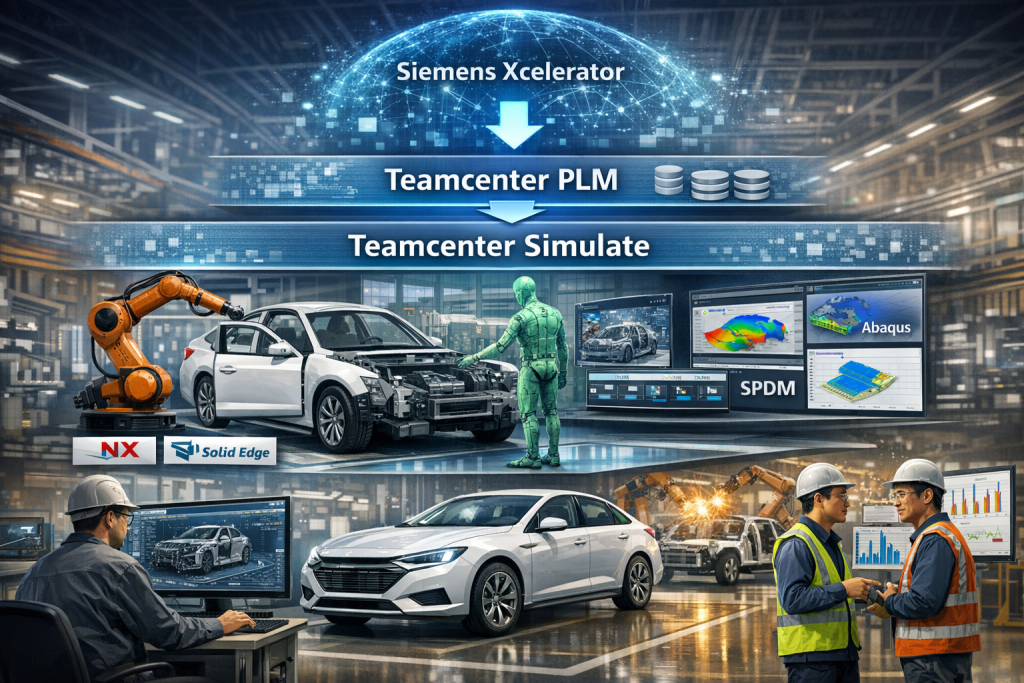
Teamcenter Simulate helps automotive teams test assembly feasibility, process plans, manufacturing logic, and simulation data inside the Teamcenter PLM environment before those issues become physical problems. In day-to-day vehicle development, that means fewer assembly clashes, faster process planning, better traceability, and tighter links between engineering and production. Siemens describes Teamcenter Simulation as an SPDM solution built on Teamcenter and tied to the Siemens Xcelerator platform, with support for simulation and test data, workflows, reuse, and digital-thread visibility. (Siemens Digital Industries Software)
A lot of people look at this kind of software and think, “Fine, it’s another simulation tool.” That misses the point.
In a real vehicle program, the hard part is not just running a check. The hard part is keeping CAD, BOM, process logic, robot paths, cost data, supplier inputs, and manufacturing timing tied together while the design keeps changing. That is where this toolchain earns its keep.
This article is built from the source report you provided on Teamcenter Simulate (Chinese Version) and revised for better SEO, better AI retrieval, and cleaner human readability without dropping any of the technical detail from the report.
- What is Teamcenter Simulate in automotive engineering?
- How does Teamcenter Simulate fit into Teamcenter PLM and Siemens Xcelerator?
- What is the core architecture of Teamcenter Simulate?
- How does Teamcenter Simulate support virtual assembly simulation?
- How does Teamcenter Simulate improve process stability in automotive manufacturing?
- How does Teamcenter Simulate support cost control?
- How does Teamcenter Simulate support cross-department and multi-disciplinary collaboration?
- What automotive case studies does the report include?
- What are the main technical strengths of Teamcenter Simulate in automotive work?
- What is the relationship between Teamcenter Simulate and Teamcenter Simulation SPDM?
- FAQs about Teamcenter Simulation and SPDM in automotive engineering
- What is Teamcenter Simulation (SPDM) and how does it relate to Teamcenter PLM?
- How does SPDM improve engineering efficiency and data traceability?
- Which tools and workflows can Teamcenter Simulation integrate with?
- What engineering problems does SPDM solve?
- What are the benefits of managing simulation results and workflows in Teamcenter?
- What is the future outlook for Teamcenter Simulate in automotive engineering?
- Final take
- Author Bio
What is Teamcenter Simulate in automotive engineering?
Teamcenter Simulate is a simulation and process-validation layer used in the automotive toolchain to connect design data, virtual verification, process planning, and production preparation through Teamcenter PLM. On Siemens’ side, the broader simulation management layer is described as Teamcenter Simulation, an SPDM solution that manages simulation processes, tools, test data, workflows, and results inside the PLM lifecycle. (Siemens Digital Industries Software)
Based on your report, Teamcenter Simulate is not treated as a standalone point tool. It is treated as a bridge between concept design and volume production. That bridge matters because automotive programs break down when design, simulation, process planning, and factory execution drift into separate systems.
Here’s the plain-English version.
It helps teams answer questions like these before launch:
- Can this part actually be assembled the way we planned?
- Will the robot hit the body, fixture, or tool?
- Will the welding order distort the structure?
- Can we shorten the line cycle without causing quality trouble?
- If design changes today, how quickly can simulation and manufacturing respond?
That is what the software is there to do.
How does Teamcenter Simulate fit into Teamcenter PLM and Siemens Xcelerator?
It sits on top of Teamcenter PLM and depends on that PLM backbone to keep product and engineering data connected. Siemens presents Teamcenter as a PLM system that gives stakeholders a single product information source and connects product development with manufacturing through the digital thread. Siemens also states that Teamcenter Simulation leverages Teamcenter and is part of the Siemens Xcelerator business platform. (Siemens Digital Industries Software)
Your report describes the same structure from an automotive angle:
- Siemens Xcelerator is the wider digital business platform
- Teamcenter PLM is the lifecycle data backbone
- Teamcenter Simulate is the automotive-facing simulation and process-validation layer used to test assembly, process logic, motion, and manufacturing readiness
- Teamcenter Simulation / SPDM is the simulation process and data management layer that keeps workflows, traceability, reuse, and simulation governance under control
People mix these names up all the time. I get why. The naming is close, and in real projects the layers work together. Still, the distinction matters if you want the article to rank for both “Teamcenter Simulate” and “Teamcenter Simulation SPDM” without sounding confused.
What is the core architecture of Teamcenter Simulate?
Your report lays out a three-layer architecture. That structure is worth keeping because it makes the system easier to understand.
Data layer: Teamcenter PLM as the base
The bottom layer uses Teamcenter PLM as the data foundation. It manages lifecycle data such as:
- CAD models from tools like NX and Solid Edge
- engineering BOMs
- manufacturing BOMs
- simulation datasets
- process files
- quality standards
Siemens states that Teamcenter gives enterprises a single source of product information and ties product development to manufacturing through the digital thread. That matches the report’s point that Teamcenter Simulate helps remove data silos between design, simulation, and manufacturing. (Siemens Digital Industries Software)
In practice, that solves one of the oldest headaches in vehicle programs: one team updates geometry, another team keeps using the old version, and weeks later somebody finds out in a review meeting that two departments have been “right” on two different revisions.
The report also says this layer supports permission-based control and secure sharing across departments and suppliers. That is a real automotive need, not a side feature.
Core engine layer: simulation and process logic
The middle layer includes three core engines in your report.
3D simulation engine
This engine supports:
- assembly simulation
- motion simulation
- collision and interference checks
The report says it can import mainstream automotive CAD data directly and includes automotive-ready templates such as body assembly sequence templates and chassis motion path templates, with parameter-based adjustment for different vehicle programs.
That saves time. No team wants to rebuild the same base logic for every new model year or derivative.
Process planning engine
This engine links simulation to manufacturing planning. According to the report, it can generate process-related documents such as:
- assembly process cards
- welding process specifications
- process files tied to validated simulation work
That matters in body shop and general assembly, where bad planning turns into expensive line-side fixes.
Data collaboration engine
This engine supports integration with:
- Simcenter STAR-CCM+
- Abaqus
- ERP
- MES
Siemens states that Teamcenter Simulation is an open platform that can integrate with Simcenter tools plus selected third-party CAD and simulation tools, while also supporting collaboration, reuse, and process control. (Siemens Digital Industries Software)
That matches your report exactly. The point is not to force every team into one solver. The point is to manage simulation data and workflow in one controlled environment.
Application layer: the Chinese-localized working layer
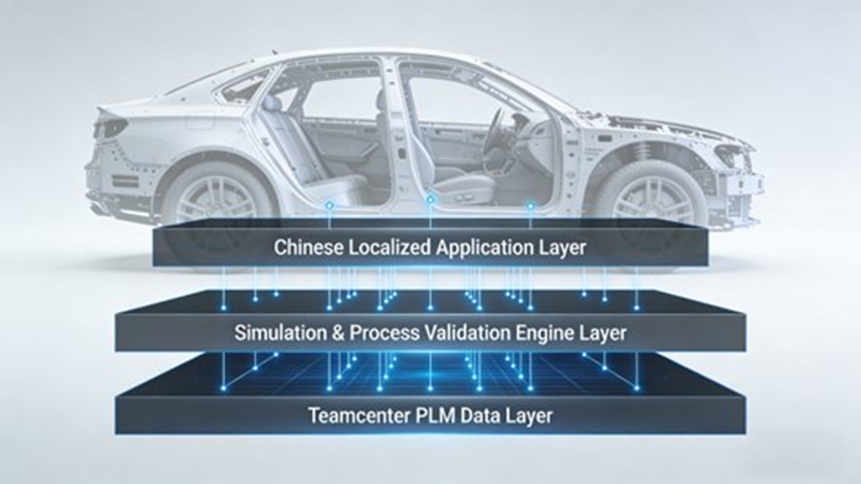
The top layer in your report focuses on the Chinese version.
It includes:
- fully localized Chinese menus
- Chinese parameter settings
- Chinese report generation
- custom workflow support based on company R&D rules
- automotive terminology libraries that match Chinese engineering usage
This part gets brushed aside too often. It should not be.
A tool can be technically strong and still fail because people inside the company hate using it. Local language, local report format, and local workflow logic reduce friction. That is how adoption happens.
How does Teamcenter Simulate support virtual assembly simulation?
It supports virtual verification of assembly order, motion path, interference, tool access, and build feasibility before teams reach physical prototype or line tryout.
Your report breaks this into three working steps.
Model import and pre-processing
The system can pull body, chassis, interior, and other component models from Teamcenter PLM. It recognizes assembly relationships and supports lightweight model handling so teams can keep the key geometry while trimming non-critical detail for smoother simulation runs.
The report also says engineers can set different precision levels depending on the task, such as:
- rough interference checks
- high-accuracy motion simulation
- process-specific feasibility validation
That makes sense. You do not need the same fidelity for every check.
Assembly sequence planning and simulation
The report shows sequence logic based on actual automotive build order, for example:
- engine assembly
- chassis assembly
- body closure installation
- interior installation
During simulation, engineers can track assembly paths and catch problems such as:
- bolts hitting trim panels
- pipe routing conflicts with chassis components
- access limits for tools
- assembly-path collisions
One example in the report describes a vehicle OEM finding a door assembly interference issue between the door and the body pillar during virtual final-assembly work. The hinge design was then adjusted before physical prototype build, and the development cycle was shortened by more than 20%.
That is the kind of fix teams want to catch early. Nobody likes finding it after tooling and prototype spend has already piled up.
Assembly feasibility validation
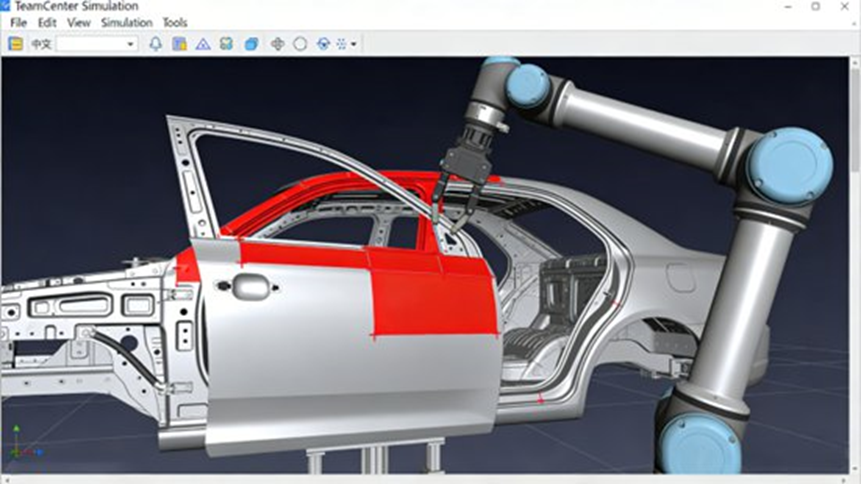
The report says the tool can test both:
- manual assembly
- robotic assembly
For critical operations such as engine or gearbox installation, it can simulate:
- force conditions
- tool fit and access
- robot reach
- gripping angle
- path motion
- collision risk
A specific example in the report covers robotic car-door assembly, where the robot path and gripping angle are checked while watching for body collisions. That leads to safer motion planning and better assembly accuracy.
How does Teamcenter Simulate improve process stability in automotive manufacturing?
It helps teams test welding logic, final-assembly flow, and line commissioning in a virtual environment before those issues hit the plant floor.
Welding process simulation
For body welding, the report says Teamcenter Simulate can model:
- robot motion paths
- welding current
- welding speed
- welding sequence
- joint setup
- deformation trends
One automotive parts supplier in the report used this to adjust welding order on a body-frame project and kept deformation within 0.5 mm, while also improving welding efficiency by 15%.
That is a strong result. In body structures, a small distortion can turn into a quality chain reaction.
Final assembly process simulation
The report says the system can simulate:
- final-assembly line layout
- station setup
- parts transport paths
- station-to-station process conflicts
- line pacing
One OEM used it to improve general assembly layout and reduced vehicle assembly cycle time from 60 minutes to 52 minutes, which increased annual capacity by 12%.
The same section also says the tool can test transport collisions and adjust conveyor speed and path logic to lower part damage.
Virtual commissioning
The report also includes virtual debugging for:
- PLC programs
- robot programs
- production-line logic
That means teams can test line behavior before live tryout.
One OEM in the report used this on a welding line and cut on-site debugging time by 15%, lowered debugging cost by 18%, and reduced the chance of equipment damage during live setup.
That one hits home for a lot of manufacturing teams. Debugging on a live line is where budgets get ugly fast.
How does Teamcenter Simulate support cost control?
It supports cost control through component cost simulation, process cost reduction, and knowledge reuse.
Component cost simulation
The report says simulation data such as material use and process logic can be linked with Teamcenter Product Cost Management for automated cost calculation.
It gives the example of ZF, which used Teamcenter-related modules and parameter-based costing to cut cost-calculation time by 95% and complete more than 2,400 cost calculations in two years.
That is not just a software metric. It means faster commercial decisions.
Process cost reduction
The report also includes an engine cylinder block machining example where simulation was used to improve process order and cutting parameters.
Results listed in the report:
- 3 machining steps removed
- 12% lower machining cost
- 20% higher machining efficiency
That is a practical factory result. No fluff. Just fewer steps and better output.
Resource and knowledge reuse
The report says simulation templates, process templates, parameters, and models can be stored in the Teamcenter PLM knowledge base for reuse.
One OEM used that reuse model to:
- cut simulation workload on a new vehicle program by 30%
- reduce development cost by 18%
That is one of the best long-term gains in the whole report. A company stops starting from zero every time.
How does Teamcenter Simulate support cross-department and multi-disciplinary collaboration?
It links design, simulation, process planning, manufacturing, and suppliers through shared data and connected workflows.
Cross-department data collaboration
The report says design updates can move quickly into simulation, while simulation feedback can move back into design, and process teams can build manufacturing plans from validated results.
That closes the loop between:
- design
- simulation
- process
- production preparation
It sounds simple on paper. In real companies, it usually is not.
Supplier collaboration
The report says suppliers can access simulation requirements and model data inside the system, run validation work earlier, and improve part compatibility before late-stage integration.
One OEM case in the report shows:
- 25% shorter supplier development cycle
- compatibility qualification rate above 98%
That is a big deal in vehicle launch work, where supplier changes can wreck timing.
Multi-disciplinary simulation collaboration
The report says the platform can manage results across structural, fluid, and motion-related work and combine outputs from different CAE tools.
Two examples from the report stand out:
- Thermal management: data from Simcenter STAR-CCM+ can be used with Teamcenter Simulate motion-related work to improve engine cooling design, fuel efficiency, and reliability
- Suspension development: Abaqus structural results can be used with Teamcenter Simulate suspension path validation to improve suspension link design while balancing comfort and handling stability
That is where the software stops being “just another simulation screen” and starts becoming part of how engineering teams make decisions together.
What automotive case studies does the report include?
It includes one full-vehicle OEM case and one parts-manufacturer case.
Case study 1: new EV development at a major Chinese OEM
The report says the OEM used Teamcenter Simulate during a new battery-electric vehicle program to replace much of the traditional physical prototype validation process with virtual verification.
Results listed in the report:
- virtual validation for battery pack, motor, and electric control system installation
- 12 assembly interference issues found
- battery pack interfering with floor longitudinal beam
- motor harness interfering with steering system
- development cycle shortened by 3 months
- development cost reduced by about RMB 2 million
- final-assembly planning improved
- line rate increased from 55 JPH to 65 JPH
- annual capacity increased by 18%
- on-site final-assembly debugging time reduced by 20%
- debugging cost reduced by 15%
- model-change response time between departments reduced from 24 hours to 2 hours
- cross-team communication efficiency improved by 80%
- full vehicle development cycle shortened by 15%
- production pass rate improved to 99.2%
That is a full program-level outcome, not a narrow pilot.
Case study 2: engine cylinder block process optimization at a parts supplier
The second case in the report covers a manufacturer focused on engine components.
It used Teamcenter Simulate for machining-process simulation and improvement.
Results listed in the report:
- cutting-force simulation
- thermal-deformation simulation
- improved process order and cutting parameters
- deformation controlled within 0.3 mm
- pass rate increased from 92% to 98.5%
- 4 redundant machining steps removed
- machining cost reduced by 14%
- simulation workload for similar part-family variants reduced by 35%
- process-planning cycle shortened by 25%
- improved process parameters pushed into the MES
- production efficiency increased by 22%
- unit energy use reduced by 10%
That is why this article should not be framed only around full-vehicle OEM work. The toolchain clearly matters for component manufacturing too.
What are the main technical strengths of Teamcenter Simulate in automotive work?
Your report points to three main strengths, and they still hold.
Single-source data control
Teamcenter gives enterprises one product information source and ties product development to manufacturing through the digital thread, according to Siemens. That matches the report’s argument that Teamcenter Simulate cuts down data silos and keeps design, simulation, and process data in step. (Siemens Digital Industries Software)
Full Chinese localization
The Chinese version lowers the learning barrier for local teams and makes the software easier to use in real engineering work.
Automotive-ready templates and faster deployment
The report says the platform includes industry-ready templates and use cases, which helps OEMs and suppliers apply it without heavy second-round customization.
That last part matters. A platform that takes forever to fit the business often loses internal support before it proves its value.
What is the relationship between Teamcenter Simulate and Teamcenter Simulation SPDM?
Short answer: Teamcenter Simulate handles practical simulation and process-validation work in the automotive workflow, while Teamcenter Simulation SPDM handles simulation data, workflows, traceability, and reuse inside Teamcenter PLM. Siemens describes Teamcenter Simulation as an SPDM solution for simulation and test processes, data, tools, and workflows with full traceability across the digital thread. (Siemens Digital Industries Software)
Longer answer:
These layers are related, not competing.
In your report, Teamcenter Simulate is the working layer used for:
- assembly validation
- motion checks
- interference analysis
- process planning
- manufacturing readiness
- cross-domain engineering checks
In Siemens’ official wording, Teamcenter Simulation / SPDM is the management layer used to:
- manage simulation and test data
- manage workflows and processes
- support reuse
- improve search and traceability
- connect simulation and product data through the digital thread
- make results easier to share with decision-makers (Siemens Digital Industries Software)
So the FAQ section below is not drifting away from the report. It fills in the simulation-data-management side that many searchers care about.
FAQs about Teamcenter Simulation and SPDM in automotive engineering
What is Teamcenter Simulation (SPDM) and how does it relate to Teamcenter PLM?
Short answer: It is Siemens’ simulation process and data management layer inside Teamcenter PLM.
Siemens says Teamcenter Simulation is an SPDM solution that manages simulation and physical testing processes, data, tools, and workflows while connecting them to other product data for traceability and visibility. (Siemens Digital Industries Software)
For automotive teams, that means CAE work, test work, CAD data, and lifecycle records can stay tied together instead of being scattered across shared folders and disconnected systems. That is how teams keep simulation work relevant to real product decisions.
How does SPDM improve engineering efficiency and data traceability?
Short answer: It cuts siloed work, improves search, supports workflow reuse, and keeps simulation results tied to the right product data.
Siemens says SPDM helps engineering teams find and reuse reference data, automate workflow steps, capture best practices, and maintain full traceability into the digital thread. (Siemens Digital Industries Software)
In automotive projects, that shows up as less rework, fewer “wrong version” mistakes, and faster reviews. The hidden win is trust. Teams stop arguing about which dataset is current and start working from the same record.
Which tools and workflows can Teamcenter Simulation integrate with?
Short answer: It can work with Siemens tools and selected third-party simulation and CAD tools.
Siemens describes Teamcenter Simulation as an open platform that integrates with Simcenter tools as well as selected third-party CAD and simulation software. (Siemens Digital Industries Software)
That fits the toolchain in your report, which mentions Simcenter STAR-CCM+, Abaqus, ERP, and MES. In real automotive programs, that openness matters because no serious engineering team lives inside one tool only.
What engineering problems does SPDM solve?
Short answer: It helps fix outdated data use, poor traceability, weak result visibility, and messy simulation handoffs.
Siemens says simulation often turns into a bottleneck when teams work with obsolete data, deliver results too late, or struggle to connect simulation and test datasets. SPDM is presented as a way to manage data volume, workflow consistency, traceability, and access across domains. (西门子动态内容)
In automotive work, those problems look familiar: duplicate analysis, CAD-to-CAE mismatch, long review cycles, and late-stage surprises that should have been caught earlier.
What are the benefits of managing simulation results and workflows in Teamcenter?
Short answer: Better traceability, better collaboration, better reuse, and better access to results.
Siemens says Teamcenter Simulation helps teams find, share, and reuse simulation and test data in a fully integrated multi-discipline PLM environment, with lightweight visualization, dashboards, and KPI extraction for broader stakeholder access. (Siemens Digital Industries Software)
For automotive teams, that means simulation work does not stay trapped inside the CAE team. It becomes easier for program managers, process engineers, and decision-makers to use the findings.
What is the future outlook for Teamcenter Simulate in automotive engineering?
Your report points to three next steps.
Deeper digital twin use
The report says Teamcenter Simulate is likely to connect more tightly with full-vehicle and production-line digital twins.
That direction also shows up in Siemens material, which ties Teamcenter Simulation to the digital thread and support for digital twin, MBSE, and verification management. (Siemens Digital Industries Software)
AI-based optimization
The report expects more AI support in:
- parameter tuning
- automatic clash detection
- simulation-speed improvement
- reduction of repetitive engineering work
Siemens is also publicly pushing AI-connected Teamcenter capabilities, including Teamcenter AI and Teamcenter Copilot. (Siemens Digital Industries Software)
Wider cross-enterprise collaboration
The report also points to wider multi-company simulation collaboration across OEMs, suppliers, and related engineering domains.
That feels realistic. EV and intelligent-vehicle programs only get more interconnected over time.
Final take
Teamcenter Simulate, especially in the Chinese-localized automotive context from your report, is best seen as a core simulation and process-validation tool built on Teamcenter PLM. It helps automotive teams deal with four stubborn problems:
- assembly interference
- unstable process planning
- cost pressure
- weak collaboration across departments and systems
It does that through the three-layer architecture in your report, the four main application areas, the integration with CAE and factory systems, and the two automotive case studies that show measurable project gains.
For engineers, this means earlier checks, fewer surprises, and a tighter loop between design and manufacturing.
For OEMs and suppliers, it means better launch control, lower rework, stronger knowledge reuse, and a cleaner path toward digital engineering at scale.
That is what this means in plain terms: less firefighting later because more was checked earlier.
Author Bio
Johnny Liu is the CEO at Dowway Vehicle. He works on automotive engineering systems, digital product development, manufacturing process improvement, and PLM-based toolchains for vehicle and component programs.
